
Create 3D games with Roblox Studio
and learn Lua coding
Roblox Game Maker is for learners aged 9 and up who already have some block coding experience. Live small-group lessons combine creating games, playtesting, planning and problem-solving through original projects.
New to block coding? Build a foundation before joining Roblox, for example through Minecraft Education Coding, then ask our teachers to assess readiness.
From player to game creator and portfolio builder
Explore scenes from our actual Roblox Studio teaching resources. Start with simple instructions, then see the results in a 3D world.
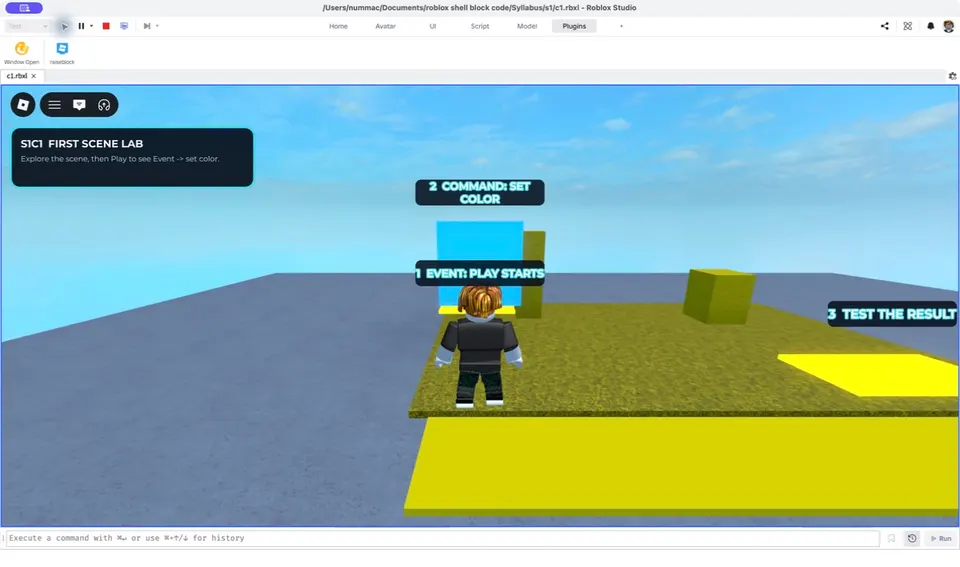
Connect an event with an instruction, then test the result in the scene.
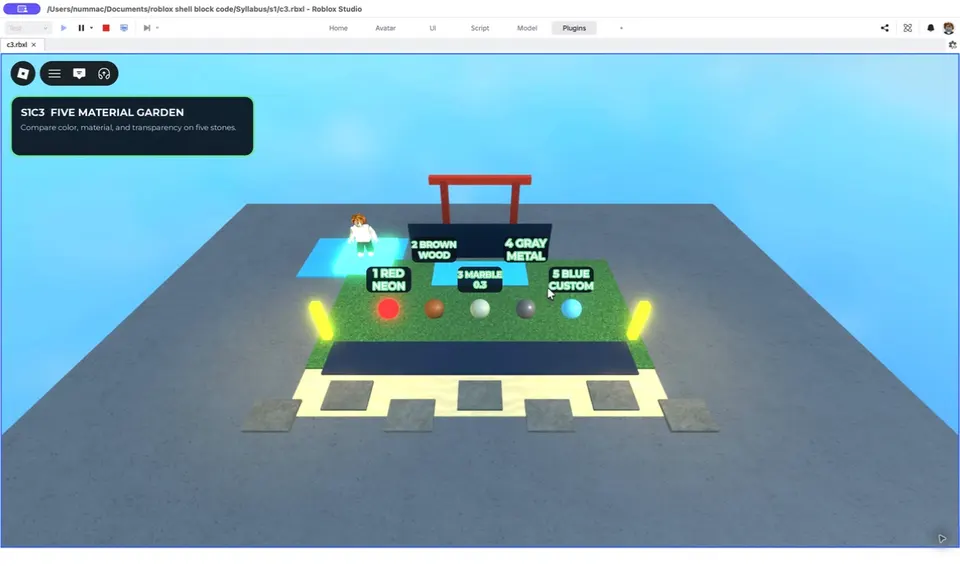
Experiment with colour, materials and transparency before using them in your own 3D world.
These examples are Raise Genius teaching resources, not students’ work. Learners’ projects vary with their ideas and experience. Select an image to view it full size.
Arrange scenes, missions, obstacles and player routes in Roblox Studio so that the game is easy to understand.
Connect familiar block coding ideas with Lua/Luau to define rules, events and responses in a game.
Playtest, gather feedback, improve the project and explain your ideas and process.
How does game creation develop coding skills?
As technology shapes study, careers and everyday life, creating digital projects gives children opportunities to participate and adapt. Game development offers an engaging reason to learn programming: learners can turn ideas into rules, scenes and mechanics, test them and share their projects with others.
Who is this course for?
Course information: The regular Roblox 3D game development fee is THB 9,500 for 12 two-hour lessons, or 24 hours in total. Learners must be aged 9 or above and have some block coding experience. Offers may be available; confirm current prices. Raise Genius School reports more than 12,530 learners over 15 years.
If your child has no block coding experience: Build a foundation first, beginning with Minecraft Education Coding before progressing to Roblox Game Maker.
Strengths of Roblox Game Maker
Roblox Game Maker learning pathway
Learners gradually move from playing games to creating them. They begin with Roblox Studio tools, 3D objects and scene design, then add rules and behaviour with Lua coding, using Roblox’s Luau language. Teachers explain the reasoning behind instructions step by step so that learners understand their code.
- Start: Explore Roblox Studio, plan a game concept, choose the player’s goal and sketch the intended scene.
- Build: Arrange scenes, characters and obstacles, then adjust viewpoints, colours and layouts to make the game clear to play.
- Add game systems: Code events and rules, investigate errors and adjust difficulty after playtesting.
- Present: Play with classmates, gather feedback, refine the game and explain the ideas and steps behind it.
These activities practise sequencing, problem-solving, creativity and communication. Learners connect what appears in the game with the code they wrote, and discover that testing and revision are part of game development. Projects vary according to ideas and experience, with teachers adapting challenges in small groups.
What should parents prepare before enrolment?
Prepare a computer that can run Roblox Studio, with a working internet connection and the agreed live-lesson communication setup. Tell our teachers the learner’s age, block coding experience and previous projects. Children without coding experience should first build a foundation, for example in Minecraft Education Coding, then have their readiness assessed for Roblox Game Maker.
Lesson format
Live online teaching through Discord in groups of up to 4 learners per teacher. Project-based learning gives students practical opportunities to create games in every lesson, with teacher interaction and guidance.
Equipment and software
A suitable Windows or Mac computer, webcam or headset and reliable internet. Confirm current Roblox Studio system requirements and the course’s setup needs with our teachers before enrolling. Roblox Studio, available free from the Roblox Creator Hub plus the agreed communication setup for live teaching with our teachers.
Published days and class times
Saturday and Sunday, with three published class times per day. One course has 12 two-hour lessons, with no enrolment fee. For ages 9 and up with some previous block coding experience. The regular course fee is THB 9,500. Confirm current availability, fees and start dates.
Further learning pathways
– Previous level for learners who are starting coding: Minecraft Education Coding – Next level for upper secondary learners preparing for subjects such as computer programming, game development, VR, AR or multimedia: Unity3D Game Maker
How to enrol
Parents can discuss the course and current class times, and arrange a place through Contact Raise Genius School Our team can suggest a suitable class and confirm enrolment details.
Explore the skills learners practise
Skills developed in this course
Design thinking: Before opening Roblox Studio, learners consider what kind of game they want to make, what the player must do, how to win or finish a level, and what makes the experience enjoyable. Teachers help divide a large idea into manageable parts, such as a start area, scoring points, obstacles and an ending. Students begin with a practical plan and add detail as their time and skills allow.
Creating 3D worlds: Learners place, move, rotate and resize objects in Roblox Studio to create spaces with clear routes. Scene design also shapes the player’s experience. Students consider where a character can go, when missions appear and where a hint might help, then playtest to see whether the layout makes sense.
Programming: To make games respond to players, learners read and modify Lua/Luau code in Roblox Studio. They connect block coding concepts with text-based instructions, including sequences, conditions, variables and events. Teachers help identify which instructions produce each result. When a game behaves unexpectedly, students practise checking one part at a time and testing changes logically.
Testing and communication: A classroom project needs playtesting. Learners consider whether a level is too easy or difficult, where a player gets stuck and whether instructions are clear. They improve the project and explain their ideas, planning and problem-solving to classmates or parents, recognising the work behind the final game.
Choose a starting point that matches experience
Choosing an appropriate starting point
Learners who know block coding but are new to Lua can connect familiar ideas with new instructions gradually. They do not need to have created a game before enrolling, but should know how to approach problems step by step and be ready to experiment with code. Previous Python experience with variables, conditions or loops may also help. Share the learner’s background with our teachers before choosing a group.
Enjoying games alone may not prepare a complete beginner for the combination of visual design, scene building and code-driven mechanics. Starting with Minecraft Education Coding can develop block coding and problem-solving foundations before Roblox Game Maker. Ask our teachers to assess experience and readiness individually, considering more than age alone.
How parents can support learning
How parents can support learning
After each lesson, ask what your child completed, what they want to improve and what the new code does. These questions help learners review their understanding and practise explaining ideas. Parents do not need coding skills. If a problem arises, save a screenshot or note the steps, then ask the teacher during a lesson or an arranged revision session. Help your child reason through the problem rather than building the game for them.
Projects and further development
The goal is to help learners explain an idea, plan a simple game structure, create a scene, define rules, playtest and improve the project at their own level. When a project is ready, classmates can try it and offer feedback. The resulting work reflects creativity and problem-solving as well as the final appearance.
Learners who want to develop games further may progress to Unity3D Game Maker when ready. Those interested in websites or databases may prefer WebApp & Database. Families can review interests, consistent practice and actual projects with the teacher before choosing the next step.
More guidance before and during the course
Before confirming a class, test Roblox Studio and the lesson communication setup on the actual computer that will be used. Tell our team about computer specifications or previous learning in advance so that teachers can recommend preparation and help you judge whether the course suits the learner’s goals.
Roblox Game Maker involves creating, testing and revising games. Allow time to experiment between lessons. An unfinished first attempt is part of learning: finding a problem and testing possible solutions helps students understand how their game works.
If you are unsure whether your child’s block coding experience is sufficient, share previous projects or describe their coding background. An early assessment helps match the class and level while supporting independent creation.
Parents can ask about example activities at each stage of the course and discuss a pathway that matches their child’s interests before enrolling.
Families may keep examples from different stages to see how planning, code reading and explanations improve. If a learner falls behind, tell the teacher promptly so that they can review the foundations before moving on.
Frequently asked questions about Roblox Game Maker
What age and previous experience are required?
For learners aged 9 and up who want to create 3D games and already have some block coding experience, for example from Minecraft Education. Previous Roblox Studio experience is not required. Beginners should first practise block coding, then ask our teachers to assess readiness. Teachers guide small groups closely throughout lessons.
Can my child enrol just because they enjoy playing Roblox?
Enjoying Roblox can inspire game ideas, but this course also involves creating characters, scenes and mechanics and writing code. Some block coding experience is required. If your child is new to coding, contact our teachers for an assessment and begin with Minecraft Education Coding first.
Can an iPad or tablet replace the main computer?
No. Roblox Studio, the game creation application, runs on supported Windows and Mac computers. The Roblox player app on a tablet is different from Studio and cannot replace it for our creation lessons. A suitable tablet may be useful for testing a compatible game, but the main lesson needs a computer. Ask our teachers to check specifications and software before enrolment; see the official Studio setup guide below. Roblox Studio setup
What courses can learners take next?
For more complex game development and portfolio projects, learners may progress to Unity3D Game Maker. Students interested in applications and databases may consider WebApp & Database using C#, according to their interests and starting skills.
Not sure whether your child is ready? Ask our teachers for an assessment and current class availability