
Course information: Unity3D game development course: standard fee THB 9,900 for 14 two-hour lessons (28 hours). Seasonal offers may be available; ask for the current price. | Raise Genius School has taught over 12,530 children over 15 years.
GAME MAKER · Live online classes in small groups
Learn Unity3D: build 3D games with C# and develop your portfolio
Turn your idea into your own game: design scenes and characters, create simple 3D models, write scripts for game mechanics, and practise presenting your work. For upper secondary students with some coding or game development experience.
Who is the Unity3D course for?
Upper secondary students
Interested in 3D games and ready to develop your coding skills? Previous experience with game creation tools or code can help you start projects more quickly.
Creative problem solvers
Create your own scenes, props, stories and game mechanics while developing systematic thinking through experiments and debugging.
Students preparing a portfolio
Develop a game project that explains your concept, design process, code and learning, then select evidence for a portfolio in a related field.
What will you learn in 3D game development?
Explore game engines and creation tools, and practise with tools used in real game development. Teachers adjust challenges to each learner’s experience.
Game design
Plan the concept, story, scenes, characters and props so that the game has clear goals and rules.
Build a 3D world
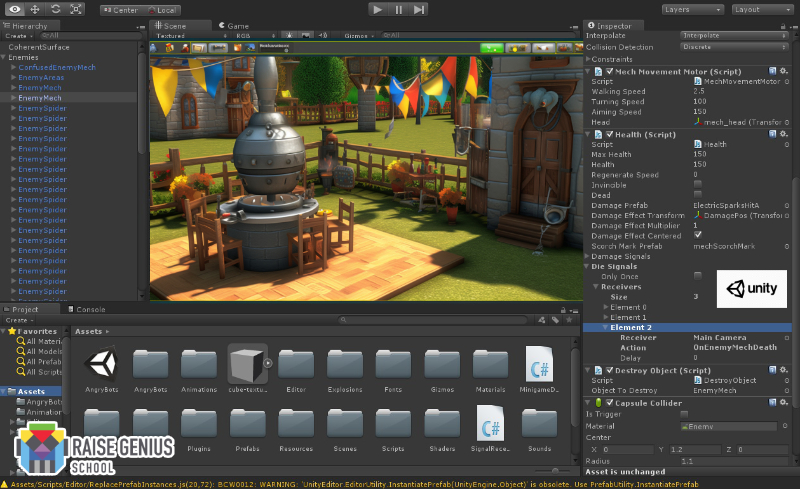
Create simple 3D models, arrange objects in a scene and test how different game elements work together.
Write C# scripts
Control characters and build game mechanics through code. Test, troubleshoot and improve your own project.
Portfolio project ideas
The examples below are possible projects that learners can develop. They are not claims about work by any particular former student. Portfolio selections depend on each learner’s goals and progress.
A playable game prototype
A short 3D game with an objective, characters and core mechanics, supported by screenshots or a demonstration video.
Behind the design
Scene sketches, a prop list, a gameplay diagram and an explanation of how the initial idea changed.
Code and problem solving
Selected C# scripts, a record of problems, testing methods and improvements made after feedback.
From an idea to a game you can present
A game project begins with a target player and a clear challenge. Plan the scenes, characters and controls, then build a prototype, playtest it and adjust the difficulty. Watching an idea become playable helps learners understand design decisions and explain their work.
- Define the challenge and plan: Choose a genre, player objective, rules and essential features to keep the project manageable.
- Build a prototype: Use simple objects and scenes to test the player’s route and camera direction before polishing every detail.
- Program the mechanics: Break the problem into smaller tasks, such as movement, collisions, scoring or scene changes, then code and test each part.
- Test with players: Observe whether players understand the rules, record errors and feedback, and prioritise improvements.
- Present the project: Collect images, video, code samples and explanations of your decisions to tell the project’s story in a portfolio.
Parents can explore additional tools and lessons at Unity Learn, Unity’s official learning resource. Class activities are adapted to each learner’s experience and pace.
Learning format and course highlights
- Live online project based learning, with practical game creation and coding.
- Classes are limited to four students per teacher, allowing close guidance and teaching adapted to individual progress, following a constructionist approach.
- Our engineering teaching team supports learners as they build projects and understands their learning needs.
- Practise designing scenes, props, stories and mechanics, with guidance on preparing a portfolio for your chosen field.
- Learn from anywhere with a suitable computer (Windows recommended) and a reliable high speed internet connection.
Class times and course conditions
Sunday class times: 09:00–11:00, 11:00–13:00 and 14:00–16:00 (Thailand time). 14 lessons × 2 hours (28 hours in total) Please confirm the current start date and class times before enrolling.
- No enrolment fee; a trial lesson is recommended before joining the course.
- The original course terms allow two absences with make-up lessons. Please confirm the current arrangements and avoid frequent or consecutive absences, as lessons and group work are connected.
- Ask about current openings, available places and suitable equipment before registering.
More information for parents and learners
Read the topics that interest you. Each learner may need different tasks and amounts of time; teachers help set a scope that matches their readiness.
How should I prepare before starting?
Discuss which programming languages or game creation tools the learner has used and what kind of game they want to make. Previous projects can help the teacher assess a suitable starting point. Make sure the computer can run the required software and connect reliably to the internet. The original course recommends a reasonably capable Windows computer and fast internet. Share the computer’s specifications before enrolling so the team can assess suitability; there is no need to buy a new machine before asking for advice.
Keep project files organised in separate folders for images, audio, code and project assets. Back up work regularly. When an experiment causes an error, record what changed and what happened. This helps the teacher diagnose problems and lets learners recognise their progress even when a game is still unfinished.
What steps are involved in making a game?
A starting challenge might be a short game with a clear objective: reach a destination, collect an item or avoid obstacles. Learners then plan rules, choose a camera angle, define controls and sketch a simple scene. This keeps the scope realistic. Before adding detailed visuals, check that the character moves, the rules work and the player knows what to do next.
Once the core game is playable, add scoring, a timer, sound or another scene at a suitable level of difficulty. Teachers encourage learners to explain design decisions rather than simply follow an example. Some projects focus on systems, others on visuals and player experience; outcomes vary with goals and the time spent building them.
How do learners practise coding and debugging?
Learners read and write C# scripts to control objects in a game. The goal extends beyond making the code run: they form hypotheses when something goes wrong, inspect variable values and change one thing at a time. Challenges may include movement, collisions, button input or the conditions for completing a level.
Breaking problems into small parts helps learners connect code to what happens on screen. Teachers can begin with simpler tasks when more foundation is needed, then increase the complexity. Save a working version before experimenting so that you can return to it and compare results. This builds confidence and persistence.
How should a project be presented in a portfolio?
A useful portfolio explains the challenge, goal, learner’s role, decisions, problems and improvements. Attractive screenshots alone do not tell the whole story. If the game is playable, include a short video or a sequence of gameplay images. Choose C# script samples that clearly show the learner’s contribution; there is no need to include every line of code.
Supporting evidence can include scene sketches, gameplay diagrams and playtest notes, with explanations of the feedback received and changes made. Identify tools and personal contributions honestly. Teachers help select evidence and tell the project’s story, but admissions depend on each institution’s criteria and the actual quality of the work. Unverified admissions outcomes should not be claimed.
How can parents follow progress?
Ask what the learner tried this week, what problems arose and what they plan to change next. These questions encourage explanation rather than focusing only on whether a game is finished. Game development includes trial and error. Small milestones, such as character movement, working scores or fixing a bug independently, are meaningful progress.
For portfolio goals, encourage before-and-after images, notes on lessons learned and regular questions for the teacher. Tell the team if the learner needs a different challenge level or has limited time. Understanding a project matters more than rushing to create something large without time to explain the process.
A guide to choosing a course and preparing a portfolio
These topics help families prepare questions for the teaching team. Choose those relevant to your goals; there is no need to tackle everything at once.
What if I enjoy playing games but am unsure about making them?
Ask the learner what they find interesting in a favourite game: its story, characters, rules, visuals or sound. Then ask what they would change. This reveals interests and helps the teacher choose an appropriate starting task. Making a short game shows how much thinking, testing and sustained work goes on behind the scenes; it is more than extra time spent playing.
Tell the teacher if the learner has never coded so that a foundation course can be considered. If they have used block coding or Python, bring examples. These show sequencing and problem-solving skills more clearly than age or school level alone.
How can I choose a game idea I can finish?
A first game does not need a huge world or online multiplayer. Choose one core activity that is easy to explain, such as exploring, collecting, solving a puzzle or avoiding obstacles. Define the win condition and the feedback players receive. A small scope leaves time to solve problems and test with real players.
Sort ideas into essentials, desirable additions and features for later. Make the game playable first, then improve its appearance. Managing scope is an important project skill and provides clear evidence of decisions in a portfolio.
Where should scene and character design begin?
Sketch a simple map showing where the player starts, where they must go and what they meet along the way. Arrange the scene to communicate the goal clearly. An attractive object that causes confusion may need a different position, colour or size. Design helps players understand the game as well as making it look appealing.
When creating simple 3D models, consider the computer’s performance and the time available. Start with basic objects and refine them later. A portfolio can compare prototype and revised images and explain changes to shapes, camera angles or routes.
How do I know whether my game works well?
Testing involves more than opening the game without an error. Check whether a new player understands the rules, whether buttons respond as expected and whether any section is too difficult. Let a friend or family member play without explaining every step to reveal problems the creator may have overlooked.
Record what players try to do, what confuses them and their suggestions. Improve one issue at a time, perhaps adding a hint, adjusting timing or moving an object. Retest to see whether the change helped. Testing and iteration are valuable portfolio evidence even if the game is not perfect.
Which evidence belongs in a portfolio?
Keep concept sketches, development screenshots, code written by the learner, debugging notes and a short video of real gameplay. Explain the challenge, personal contribution and result for each piece. Many images without context may fail to show the learner’s actual ability.
Select evidence that forms a coherent story: the problem, thinking, practical work, outcome and lessons learned. For a shared project, identify the learner’s own role clearly. Honest explanations help reviewers understand both the learning process and the learner’s responsibility.
How should I organise time for online learning?
Allow time to check the computer and open files before class, as technical problems reduce practical learning time. During a lesson, note questions and capture errors so the teacher can help precisely. Afterwards, review changed files and back up the work securely.
Game projects may require some practice outside class, depending on the learner’s goals, but should remain enjoyable. Small tasks and weekly goals make progress visible. If a problem persists, bring questions and a record of attempted fixes to the teacher rather than deleting everything and starting again without understanding the cause.
What should I ask before enrolling?
Ask about current class times, lesson count and length, trial lessons and make-up arrangements. Share the learner’s experience and computer model. Discuss whether the goal is enjoyment, coding practice or a portfolio, as tasks and intensity can vary.
If a project is needed for a dated application, tell the teacher the deadline early so that a realistic scope can be assessed. Dates, times and places may change; confirm directly before arranging travel or other family commitments.
How should learning outcomes be assessed?
Assessment looks beyond attractive graphics or the length of a game to whether learners can explain ideas, plan and solve problems more independently. In the Unity3D course, a small project the learner understands fully can be more valuable than a large one they cannot explain. Teachers and parents can review prototypes, test records, revised code and plans for the next improvement.
For a portfolio, plan what the project should demonstrate, what interests the learner and how much preparation time is available. Collect evidence regularly rather than immediately before submission. Progress depends on experience, practice and engagement with teachers; identical outcomes should not be promised for every learner.
How can I develop further after my first project?
Once the first game is playable, choose a focused improvement: refine the player experience, add scoring, make a new scene or explore visuals and sound. One priority at a time makes the effects of each change easier to see. As Unity3D learning continues, interests may develop in game design, programming, modelling or testing. Each path uses different skills and should reflect the learner’s interests.
Sharing a game and receiving feedback also develops communication. Learners can explain what they tried, where it failed and how they changed approach. For further independent study, start with official documentation and small tasks. Regular practice is more useful than jumping immediately into complex systems. Teachers can recommend the next skill to practise based on completed work.
Before starting, share your goals, experience, past projects, practice time and portfolio deadline with the teacher to choose an appropriate challenge. Keep project files, process images, problem notes and test results in order. When asking for help, explain what you expected, what actually happened and what you already tried. This supports precise guidance and makes progress visible.
Frequently asked questions
Can I join if I have never used game development software?
If you have some coding or game creation experience, ask the teacher to assess a suitable starting point. Challenges are adapted to the learner’s background.
How does this course support portfolio preparation?
Learners develop their own game and collect evidence such as screenshots, design concepts, C# script samples and problem-solving notes to select for a portfolio.
What equipment do I need?
A reasonably capable Windows computer and a reliable high speed internet connection are recommended. Contact the teacher to confirm that your computer is suitable before starting.
How many lessons are there, and can I try a lesson first?
There are 14 Sunday lessons of two hours each (28 hours in total). Ask about the 09:00–11:00, 11:00–13:00 or 14:00–16:00 class (Thailand time). A trial lesson is recommended before enrolling. Confirm the current start date and class times with the team.
Ready to start creating your own game?
Discuss the learner’s experience, computer preparation and portfolio goals before enrolling. Raise Genius School has over 12 years of experience teaching children and young people.
Ask about the 3D game development course →